ESC
开源 8 分钟阅读

HolyArrs:一个用于节目、电影和音乐的自托管应用

HolyArrs 是一款整合型自托管应用,可统一管理影视音资源请求、下载与整理,替代 Sonarr、Radarr 等多套系统,降低资源占用与维护复杂度。

来源:GitHub

English · 简体中文 · हिन्दी · Español · Français · العربية · Português · Русский · 日本語 · Deutsch · 한국어 · Italiano · Polski · Nederlands · Türkçe · Українська

HolyArrs: one self-hosted app for shows, movies, music and downloads

HolyArrs.com Roadmap What's new

Build OpenSSF Scorecard OpenSSF Best Practices Version Docker pulls Licence: AGPL-3.0

#1 on Show HN

[!NOTE] HolyArrs 1.0.19:将 rTorrent 和 ruTorrent 作为下载器,也支持 seedboxes。已完成的 Usenet 下载现在会移入您的库,而不是复制。查看新内容

HolyArrs 1.0.19

每张海报、预告片和配乐在您的 HolyArrs 中都来自我自己运行并付费的服务器,因此对所有人免费。如果 HolyArrs 让您的电影之夜更美好,一位赞助者为我们所有人保持灯光 💛

Sponsor HolyArrs

[!TIP] 与我们同行!

Discord快速获得帮助,并在 Discord 上聊天
r/HolyArrs分享想法并在 r/HolyArrs 上投票
X在 X 上获取抢先预览
GitHub followers在 GitHub 上查看更多项目

六个观看节目的应用。现在合而为一。

HolyArrs 是一个用于您的节目、电影和音乐的自托管应用。
像流媒体应用一样浏览,请求您想要的内容,它来处理其余事务。

约 15 MB 下载 · 约 140 MB 空闲内存(含 10,000 个条目)· amd64, arm64, armv7
它替代的六个应用合计下载 718.2 MB。

快速入门 · 为什么 · 功能 · 从其他应用迁移 · 手册 · 帮助

HolyArrs Explore: 悬停标题并播放预告片

🚀 两分钟内运行

将以下内容保存为本地磁盘上新文件夹中的 docker-compose.yml:

name: holyarrs
services:
  holyarrs:
    image: holyarrs/holyarrs:latest
    container_name: holyarrs
    environment:
      - PUID=1000
      - PGID=1000
      - TZ=America/New_York
    volumes:
      - /your/local/path:/config
      - /path/to/movies:/movies #可选
      - /path/to/tv:/tv #可选
      - /path/to/music:/music #可选
      - /path/to/downloads:/downloads #可选
    ports:
      - 6262:6262
    restart: unless-stopped
docker compose up -d

打开 http://your-server:6262 并创建所有者账户。简短的设置将引导您完成文件夹、下载器和源的配置。

无需寻找 API 密钥。无需第二个容器。所有设置均在手册中详细说明。

💡 为什么我构建了它

普通的媒体服务器运行六个应用:Sonarr、Radarr、Lidarr、Bazarr、Prowlarr 和 Seerr。

那是六次登录、六个端口、六个更新周期以及六个需要互相复制的 API 密钥。当剧集未下载时,您需要检查六个地方以找出原因。

我想要一个应用。一个登录、一个端口、一个查看位置。

所以我构建了它。

应用下载 (amd64)空闲内存登录Web 端口
Sonarr87.9 MB11
Radarr91.0 MB11
Lidarr121.3 MB11
Prowlarr80.8 MB11
Bazarr156.4 MB11
Overseerr180.8 MB11
六个合计718.2 MB66
HolyArrs14.9 MB~140 MiB11 (6262)

约小 48 倍。压缩注册表下载,linuxserver.io 镜像,amd64,测量于 2026-11-08。空闲内存以 10,000 个条目和 55,000 部电影及剧集测量。

🎬 请求一个标题,它就会出现在您的库中

有人请求一个标题。HolyArrs 搜索您的源,根据您的挑选规则选择最佳版本,将其发送到下载器并整理到您的库中。媒体服务器会在其到达时收到通知。

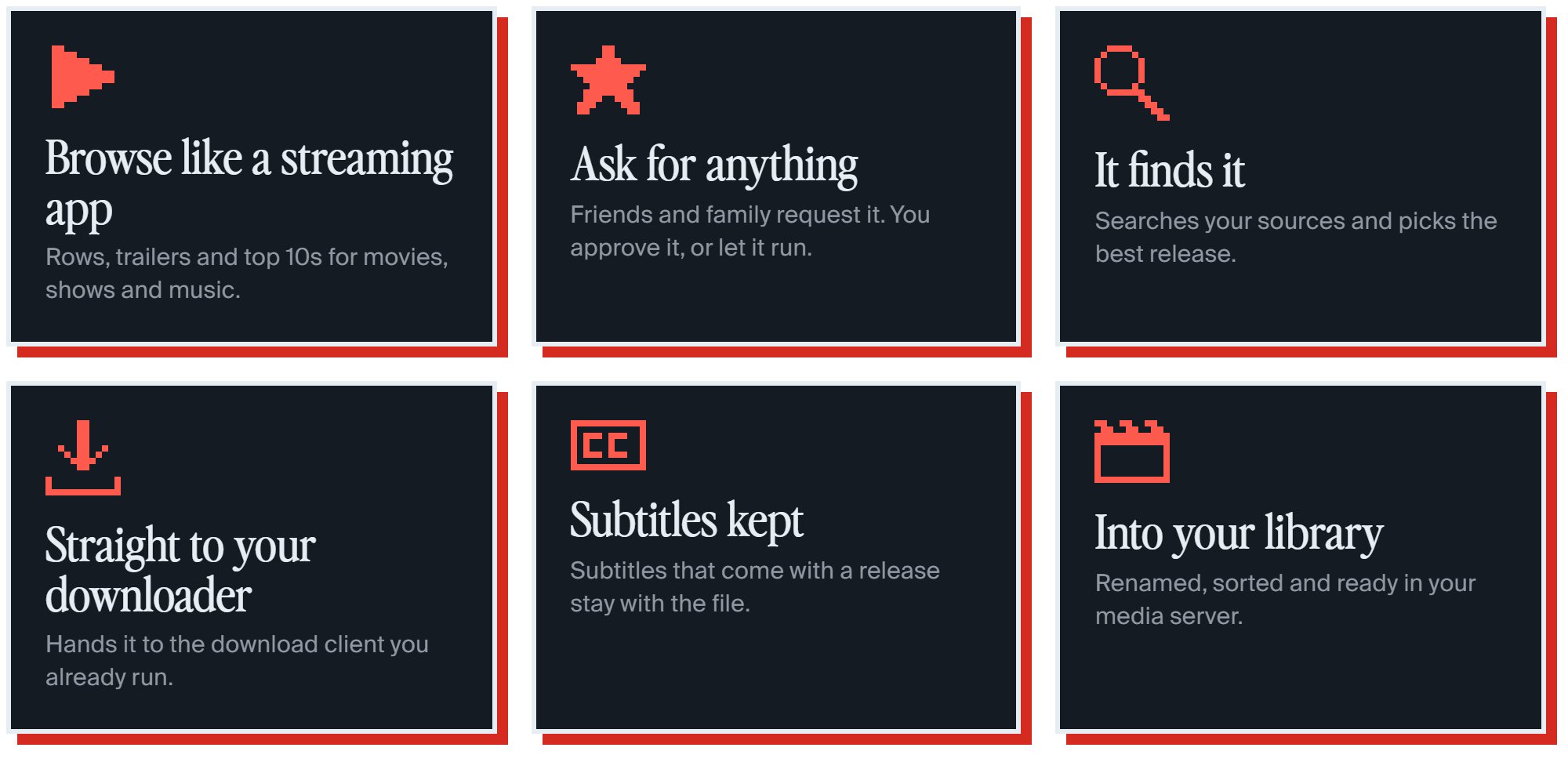
像流媒体应用一样浏览。请求任何内容。它会找到它。直接进入您的下载器。字幕保留。进入您的库。

🍿 探索像流媒体应用一样浏览。悬停标题并播放预告片。
🙋 请求整季或单季。您批准,或让受信任的人跳过队列。
🎯 挑选规则您决定哪个版本胜出:大小、质量、语言。
💬 字幕您选择的语言,与文件一起保留。在线查找它们在 1.0 之后。
📅 日历您关注的所有内容的下一步播出。
🚚 移动您的设置从 Sonarr、Radarr、Lidarr、Prowlarr、Bazarr、Seerr、Overseerr、qBittorrent 和 SABnzbd 迁移。先试用,之后可撤销。
🔌 旧应用 APIProwlarr 可以继续向 HolyArrs 推送源,一旦您启用它。
🗝️ 无需 API 密钥标题、海报和图表来自我运行并付费的服务器,因此对所有人免费。

the HolyArrs metadata server. | | 🔒 Encrypted keys | Stored passwords and keys are locked with a master key that lives in your config folder. | | 🪶 Tiny | An image of about 15 MB with nothing but HolyArrs inside. |

See every page in motion
Home
Home · Everything waiting on you, at a glance.
Title page
Title page · Trailer, cast and one button to ask.
Requests
Requests · Approve what friends and family ask for.
Downloads
Downloads · Every grab, live, in one table.

🤝 It works with what you already run

Downloaders: qBittorrent, Transmission, Deluge, SABnzbd, NZBGet. Media servers: Plex, Jellyfin, Emby.

  • Downloaders: qBittorrent, Transmission, Deluge, rTorrent, SABnzbd, NZBGet
  • Media servers: Plex, Jellyfin, Emby
  • Sources: any Torznab or Newznab indexer, or Prowlarr or Jackett
  • Moves your setup from: Sonarr, Radarr, Lidarr, Prowlarr, Bazarr, Seerr, Overseerr, qBittorrent, SABnzbd

🚚 Bring your old setup with you

Open Settings > Move from other apps, add each old app’s address and API key (or a backup zip), pick what comes over, run Try it, then Move. You can undo a move later.

FromWhat comes over
Sonarr, Radarr, LidarrLibrary folders, titles, quality profiles as Pick rules, exclusions, naming, indexers and download clients
ProwlarrIndexers as Sources
BazarrDefault subtitle languages
Seerr, OverseerrPeople and their waiting or approved requests
qBittorrent, SABnzbdDownloaders

HolyArrs only reads your old apps and changes nothing in them, so you can run both side by side until you trust it.

Keys and passwords stay behind; you type them in again or import them from a file. Custom formats, tags and history don’t come over. Media files never move. Step by step: Move from other apps.

🧭 What it doesn’t do yet

  • Downloading by itself. HolyArrs connects to qBittorrent, SABnzbd and the others. It doesn’t replace them.
  • AI or MCP features. Not in 1.0.
  • Phone and TV apps. Not built. The web app works on a phone.
  • Music in Explore is still being built.

What’s next is on the roadmap. You vote, I build. Post ideas on r/HolyArrs.

❓ Questions people ask first

Do I keep qBittorrent or SABnzbd? Yes, for now. HolyArrs connects to the downloader you already run. A built-in downloader is planned for a later release.

Can Sonarr and Radarr keep running while I try it? Yes. HolyArrs reads them once and never changes them.

Is it free? Yes. It’s free and open source.


📖 The manual

Everything below is reference. The full guides live at docs.HolyArrs.com.

Supported architectures

Pulling holyarrs/holyarrs:latest gets the right image for your machine.

ArchitectureAvailableRuns on
amd64✅Most PCs, servers and NAS boxes
arm64✅Apple silicon, newer Raspberry Pis, ARM servers
armv7✅Older 32-bit ARM boards

On a NAS? See Unraid, Synology and other NAS boxes.

Version tags

Images live on Docker Hub as holyarrs/holyarrs.

TagUse it for
latestThe newest release.
1.0.19One exact version. It never moves.

Usage

name: holyarrs
services:
  holyarrs:
    image: holyarrs/holyarrs:latest
    container_name: holyarrs
    environment:
      - PUID=1000
      - PGID=1000
      - TZ=America/New_York
    volumes:
      - /your/local/path:/config
      - /path/to/movies:/movies #optional
      - /path/to/tv:/tv #optional
      - /path/to/music:/music #optional
      - /path/to/downloads:/downloads #optional
    ports:
      - 6262:6262
    restart: unless-stopped

docker cli

docker run -d \
  --name=holyarrs \
  -e PUID=1000 \
  -e PGID=1000 \
  -e TZ=America/New_York \
  -p 6262:6262 \
  -v /your/local/path:/config \
  -v /path/to/movies:/movies `#optional` \
  -v /path/to/tv:/tv `#optional` \
  -v /path/to/music:/music `#optional` \
  -v /path/to/downloads:/downloads `#optional` \
  --restart unless-stopped \
  holyarrs/holyarrs:latest

Container settings go in compose. Everything else is set in the app.

Parameters

Each one is written <outside>:<inside>. Change the left side only.

ParameterFunction
-p 6262:6262The web app.
-e PUID=1000The user HolyArrs runs as. See User and group.
-e PGID=1000The group HolyArrs runs as.
-e TZ=America/New_YorkYour time zone, for the calendar, schedules and logs. Etc/UTC when left out.
-e UMASK=022Optional. Permission bits new files leave out. Use 002 when a group must write too.
-v /configDatabases, settings, the master key, backups and logs. Local disk only, never a network share.
-v /moviesOptional. A movie Library folder.
-v /tvOptional. A shows Library folder.
-v /musicOptional. A music Library folder.
-v /downloadsOptional. Your downloader’s download folder.
--read-only=trueOptional. Only /config and /tmp need to be writable.
--user=1000:1000Optional. Start as a fixed user. PUID and PGID are then ignored.

More variables (reverse proxy, URL base, save path): Environment variables.

Environment variables from files

Put FILE__ in front of any variable to read its value from a file, such as a Docker secret:

environment:
  - FILE__HOLYARRS_ALLOWED_HOSTS=/run/secrets/holyarrs_hosts

User and group

PUID and PGID must match the user that owns your media folders. Find them with:

id youruser
# uid=1000(youruser) gid=1000(youruser)

HolyArrs never changes the owner of your media or download folders. Give that user write access to them, because HolyArrs makes folders and moves files.

Application setup

Open http://your-server:6262 and make the owner account right away. There is no default password. Until you make it, whoever opens HolyArrs first becomes the owner.

The setup that opens next asks for your folders, a downloader and a Source. Guide: First run.

Media folders

The four optional mounts are the easy way to start. The cost: each mount is its own filesystem inside the container, so every import is a full copy.

Want instant moves that take no extra space? Mount one parent folder with downloads and Library folders inside it, and give your downloader the same mount at the same path. Guide: Folders.

Docker Desktop on Windows and Mac

Use a named volume for /config. Media folders can stay host folders. Guide: Install.

Keep your master key safe

holyarrs.key in your config folder is what opens your stored passwords and keys. Backups don’t include it, so keep a copy somewhere else. As the owner, open Settings > Backups and choose Download key kit. See Backups.

Updating

docker compose pull
docker compose up -d

If the new version changes how data is stored, HolyArrs makes a backup first. To go back to it: docker exec holyarrs /holyarrs restore --pre-update, then docker restart holyarrs. Never remove /config during an update. See Updates.

Security

  • The owner account is made at first visit. There is no default password.
  • Stored passwords and keys are encrypted with holyarrs.key.
  • The image has no shell inside it.
  • Don’t forward port 6262 on your router. Use a VPN such as Tailscale, or a reverse proxy with HTTPS.
  • Report security problems privately: SECURITY.

Support info

The image has no shell, so docker exec -it holyarrs /bin/bash won’t work. HolyArrs’ own commands do:

  • Follow the log:

    docker logs -f holyarrs
    
  • Check your setup. Every line says OK, WARN or FAIL, and each WARN or FAIL says how to fix it:

    docker exec holyarrs /holyarrs doctor
    
  • Locked out of the owner account:

    docker exec -i holyarrs /holyarrs reset-owner
    
  • Version number:

    docker inspect --format '{{ index .Config.Labels "org.opencontainers.image.version" }}' holyarrs
    

Troubleshooting

You seeDo this
Permission denied on media foldersPUID and PGID don’t match the owner of those folders. Run id youruser, put those numbers in compose and recreate the container.
Errors with the config folder on a network shareThe database needs a local disk. Move /config to a local path. Media folders on a share are fine.
Port 6262 is already in useChange the left side only, for example 6263:6262, and open http://your-server:6263.
HolyArrs can’t reach qBittorrent or SABnzbdInside a container, localhost means the container itself. Use the downloader’s container name on the same Docker network, or the host’s IP address.
Imports are copiedMount one shared parent folder. See Media folders.

More: Troubleshooting.

Where to ask

You haveGo to
A questionDiscord
An idea or a voter/HolyArrs and the roadmap
A bugIssues (bugs and roadmap only)
A security problemSECURITY
Anything elsesupport@HolyArrs.com

Contributing

Read CONTRIBUTING, then Architecture and Setup. Open an issue before a big change.

On your first pull request a bot asks you to accept a short licence agreement (CLA.md). One click, once.

Licence

HolyArrs is free and open source under the GNU AGPL-3.0.

Want to build it into a closed product? Email support@HolyArrs.com for a commercial licence.

Keep it going

HolyArrs is free, but it isn’t free to run. Every install talks to a metadata server I pay for every month. Sponsors cover that, and buy more hours for the things you vote for.

Sponsor HolyArrs Vote on the roadmap


Built by CoderLuii.
If HolyArrs saves you from running six apps, a star helps other people find it.